
Building an app requires a paid plan. A paid plan gives you monthly credits that refill on your billing date, used as you build and as your published app runs AI integrations.
Plans
Choose your credits per month. Higher tiers come with a 10% volume discount in credits. Annual billing comes with 2 months free.- Pro 20k - $19/mo (annual); $24/mo (monthly) - 20k credits
- Max 200k - $199/mo (annual); $239/mo (monthly) -
200k220k credits - Max 300k - $299/mo (annual); $359/mo (monthly) -
300k330k credits - Max 400k - $399/mo (annual); $479/mo (monthly) -
400k440k credits - Max 500k - $499/mo (annual); $599/mo (monthly) -
500k550k credits - Max 600k - $599/mo (annual); $719/mo (monthly) -
600k660k credits - Max 750k - $749/mo (annual); $899/mo (monthly) -
750k825k credits - Max 900k - $899/mo (annual); $1,079/mo (monthly) -
900k990k credits
How credits work
Credits are used in three ways:- Building your app - every message you send uses credits. Anything uses AI models to generate code, images, and more.
- AI integrations - when your published app runs an AI integration, it uses credits per run. Many integrations are free. You can also add Functions with your own API keys to avoid credit usage.
- Templates - purchasing paid templates from the marketplace costs credits. Free templates are available too.
Modes
Different modes use different amounts of credits.Models
Anything uses a mix of models from Anthropic (Claude), OpenAI (GPT), Google (Gemini), Moonshot (Kimi), and open source. The agent picks the right model for each step to balance cost, speed, and accuracy depending on the task and project complexity. You can override the default with the model switcher. Some models are more capable but cost more credits. Others are faster and cheaper.Managing credits
All plans come with a set number of credits per month.- Credits refill on your billing date
- Unused monthly credits expire at the end of your billing cycle
- Top-off credits don’t expire
- Upgrade your plan for higher monthly limits
Top-off credits
- $12 for 10k credits
- $60 for 50k credits
- $120 for 100k credits
- $240 for 200k credits
Optimizing usage
The agent uses a variable number of credits per prompt based on task complexity. You send a prompt, the agent thinks, plans, explores the codebase, and generates code. It might only need to change 1 file, or it might need to change 10. Fewer steps means fewer credits.Plan, then build
The biggest credit saver is splitting one big prompt into two smaller ones. Switch to Plan mode and ask the agent what it would do. It explores your project and writes out a step-by-step plan, without changing any code. Plan mode is low cost because nothing is generated yet. Review the plan. If it looks right, switch to Thinking mode and tell the agent to go ahead. You’ll get fewer surprises, fewer rebuilds, and far fewer follow-up messages.Other ways to save
- Build bottoms up - get each part working from frontend to backend. Start with the UI, then add data, users, payments. Building bottoms up means fewer large turns.
- Thinking vs. Fast - Thinking gives better results and we recommend it as your default. Better results means fewer follow-up messages, which saves credits overall. Use Fast for minor tweaks like changing a color.
- Be specific - clear prompts reduce back-and-forth. See the prompting guide.
- Try GPT or Gemini models - use the model switcher to try different models. They can give comparable results at a lower credit cost for some tasks.
- Subscribe - plans come with volume discounts vs. buying top-off credits one-off.
Hitting your limit
When you run out, upgrade your plan or buy top-off credits to keep building.- In the builder, a banner appears above chat when your credits are running low. Click Add credits to upgrade your plan or buy top-off credits before you hit the limit.
- At the limit, Anything prompts you to upgrade when you send your next message.
- For published apps with AI integrations, you’ll get an email alert from
hello@anything.comas you approach your limit.
Earn free credits
There are two ways to earn credits without paying: post about your app on X, or refer a friend. You can start either one from the gift icon in the builder, or from the dashboard.From the builder
Click the gift icon in the top right of the builder to open Earn free credits. It’s the fastest path because it builds your post for you.- The modal drafts a post about your app. Edit it, or hit refresh to regenerate. The back and forward arrows step through earlier drafts.
- Pick a screenshot of your app to attach. Web apps attach one page; mobile apps let you pick up to three.
- Click Post on X. The X composer opens with your text and screenshot already filled in. Publish it there.
- Come back and click submit a link to your post to claim your credits.
Share on X
Post about what you’re building and earn credits. You can also start this from your dashboard under Get Free Credits.- Connect your X account ($5 in credits just for connecting).
- Post about your project on X.
- Submit a link to your post to claim. You can earn up to $10 in credits per day, and better posts earn more.
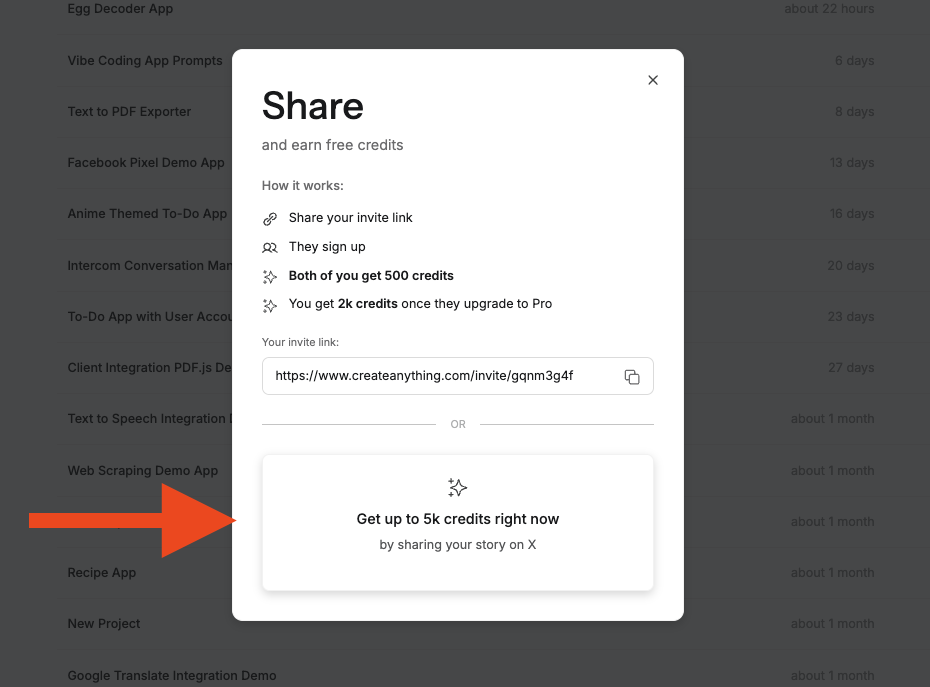
Earning free credits by posting on X
Refer a friend
Share your referral link and earn credits when friends sign up. Find your link in the gift icon menu in the builder, or in the dashboard under Get Free Credits.- You and your friend each get $0.50 in credits when they sign up.
- You get another $2 in credits once they upgrade to Pro.
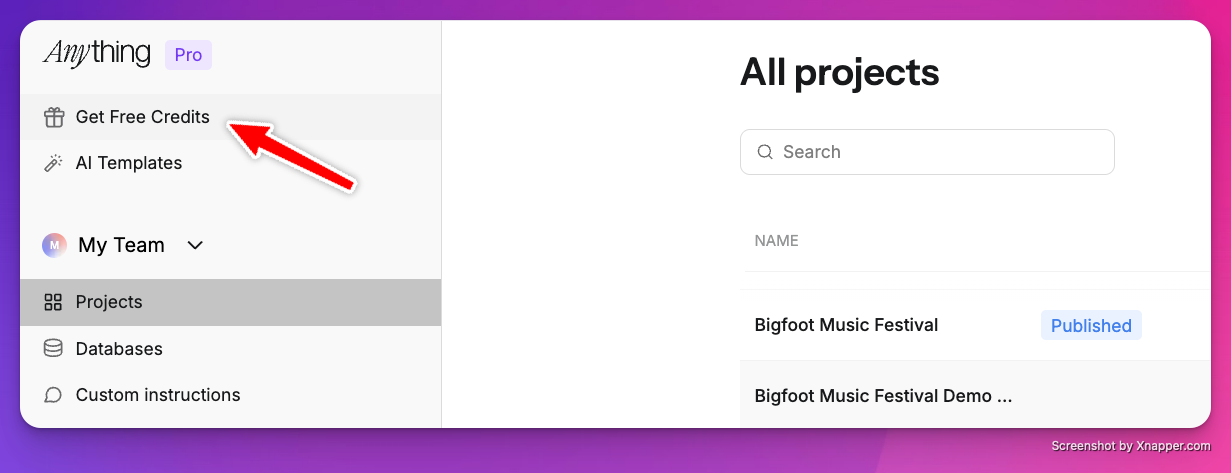
Referral program in the dashboard
Troubleshooting
Why are my credits going so fast?
Why are my credits going so fast?
Max mode and Thinking mode use more credits than Fast, Discussion, or Plan. Complex prompts that touch many files also cost more. Try using Plan mode to get a step-by-step plan first, then switch to Thinking to execute. You’ll use fewer credits overall because you’ll need fewer follow-up messages.
I purchased credits but they didn't appear
I purchased credits but they didn't appear
Refresh your dashboard first. Make sure you’re logged into the same account you purchased with. If the purchase button wasn’t responding, try an incognito window or clear your browser cache. If credits still don’t show after that, email hello@anything.com.
When do my credits refill?
When do my credits refill?
Monthly credits refill on your billing date. Unused monthly credits expire at the end of each cycle. Top-off credits never expire.
Request a credit refund
If a generation didn’t work as expected, you can get an instant credit refund, no need to contact support.1
Find the generation
Scroll through your chat history and find the message that didn’t work. Each generation shows the mode used, timestamp, and credit cost.
2
Click Request Refund
Click Request Refund on that generation. Credits are returned to your account instantly.
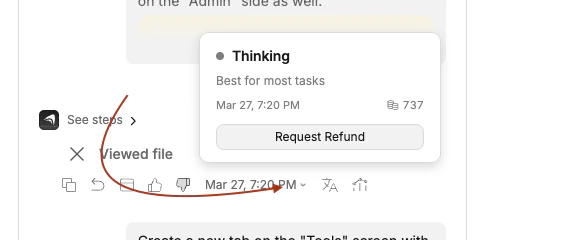
Click Request Refund on any generation that didn't work as expected
Refund can't be processed?
Refund can't be processed?
If a refund can’t be processed, you’ll see one of these messages:
- Already refunded. That generation was already reimbursed.
- Monthly limit reached. You’ve hit the refund cap for this billing cycle.
- Not eligible. That generation doesn’t qualify for a refund.
Can I get a subscription refund?
Can I get a subscription refund?
Anything does not offer subscription refunds since AI costs us to run. If you think your case qualifies for an exception, email hello@anything.com.