
Plans
- Pro - Start building for real. Private projects, publish to the App Store, custom domains, and accept payments with Stripe and RevenueCat.
- Max - For people who launch. Our smartest AI models, plus a browser agent that opens your app, tries it out, and fixes issues for you automatically.
A paid plan is required to build. If you start a build without one, Anything takes you to checkout and carries your prompt through, so your app starts generating the moment you subscribe.
Pricing
- Pro 20k - $19/mo (annual); $24/mo (monthly) - 20k credits
- Max 200k - $199/mo (annual); $239/mo (monthly) -
200k220k credits - Max 300k - $299/mo (annual); $359/mo (monthly) -
300k330k credits - Max 400k - $399/mo (annual); $479/mo (monthly) -
400k440k credits - Max 500k - $499/mo (annual); $599/mo (monthly) -
500k550k credits - Max 600k - $599/mo (annual); $719/mo (monthly) -
600k660k credits - Max 750k - $749/mo (annual); $899/mo (monthly) -
750k825k credits - Max 900k - $899/mo (annual); $1,079/mo (monthly) -
900k990k credits
Top-Off Credits
Need extra credits before your next billing cycle? You can purchase top-off credits anytime. Top-off credits do not expire.- $12 for 10k credits
- $60 for 50k credits
- $120 for 100k credits
- $240 for 200k credits
Support
Community Support
Get help from our community of creators and the Anything team
Premium Support
Premium email support for paid members
Cancel or downgrade
- Go to your dashboard
- Click Subscription & Credits
- Click Update Plan
- Click Manage Subscription in the upper right
- Select Cancel or choose a different plan
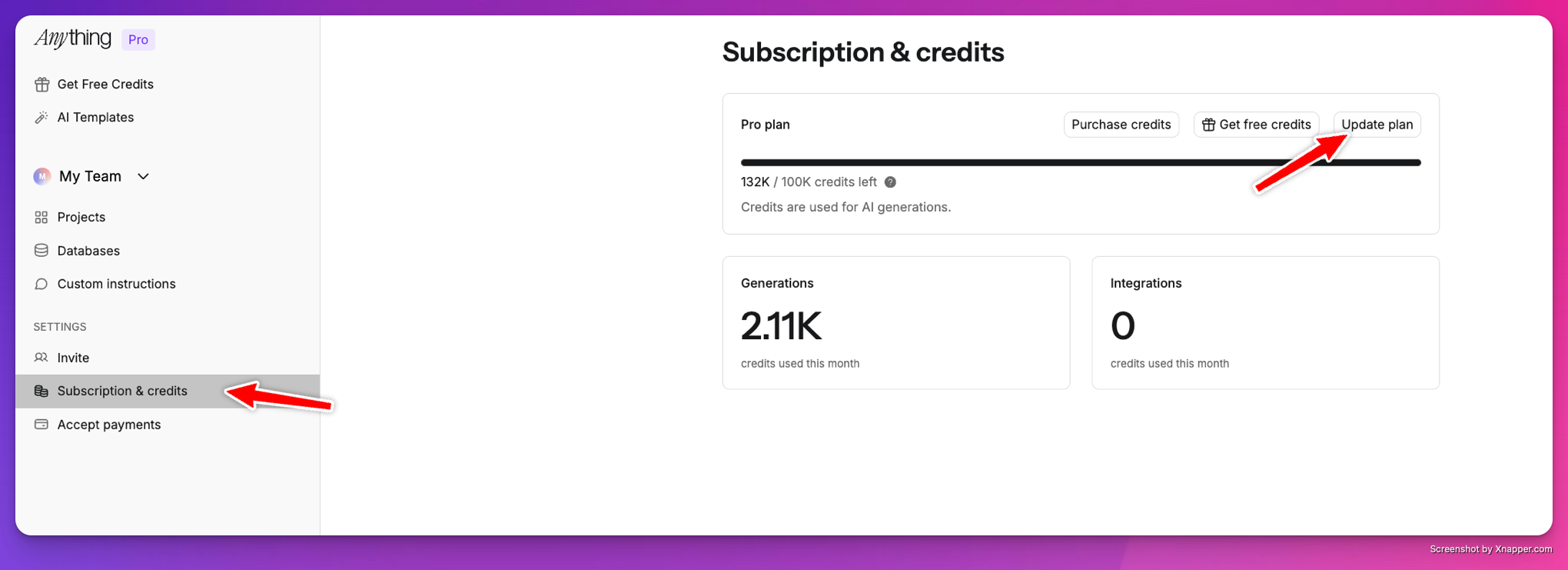
Update Plan screen in the dashboard
Upgrade
- Go to your dashboard
- Click Subscription & Credits → Update Plan
- Pick your new plan
Billing history
View invoices, receipts, and past charges from Subscription & Credits in your dashboard.FAQ
Still being charged after canceling
Still being charged after canceling
The most common reason is a retry on a failed charge from a prior bill, not a charge for a future month. For example, if your March payment failed and you canceled in April, you may still see a charge as that March invoice retries. Cancellation also takes effect at the end of your current billing cycle, so you may see one more charge. Check Subscription & Credits in your dashboard to confirm your plan shows as canceled. If charges continue after your cycle ends, email hello@anything.com.
When do my credits refill?
When do my credits refill?
Can I get a refund?
Can I get a refund?
Anything doesn’t offer subscription refunds, but paid subscribers can get instant credit refunds for generations that didn’t work. Click Request Refund on any generation in your chat history, no need to email support. See Request a credit refund for a walkthrough.
What happens when I downgrade to Free?
What happens when I downgrade to Free?
Your data and published work stay intact, but building requires a paid plan, so you can’t start new generations on Free. Here’s what changes:
- All data retained
- Published apps and projects remain published
- Anything.com branding appears on published web apps and websites
- Mobile apps in TestFlight or the iOS App Store are untouched
- Max Mode is removed if applicable
- Publishing to custom domains and mobile app stores is disabled
- Building is paused until you resubscribe
Is annual billing charged monthly or all at once?
Is annual billing charged monthly or all at once?
Annual billing is charged as a single payment upfront. For example, Pro Annual is $228 charged once per year, not $19 per month. The monthly rate shown ($19/mo) is the per-month equivalent. You can cancel anytime but annual payments are non-refundable.
I accidentally chose annual billing
I accidentally chose annual billing
Check the monthly/yearly toggle on the pricing page before subscribing. Each plan shows the savings for annual billing so you know which option you’re picking. If you need to switch, email hello@anything.com and we’ll help.